VPS DEALS · SHORTLIST METHOD
VPS Deals: Turn a Plan List into a Workload Shortlist
Do not rank VPS deals by the headline price first. Write down what your workload must do, check each exact plan against those requirements, and keep unsupported fields as Unconfirmed. Remove a candidate only when it fails a hard requirement; do not let an attractive specification cancel a failed requirement.
This page is a plan-screening method, not a live offer list or performance test. Provider-specific examples below are limited to the named official documentation reviewed on 2026-10-02. Prices, codes, and inventory are not inferred here.
What an official plan page can establish
A plan card is a starting point. The official product documentation may define how a resource behaves or how billing continues after deployment. Those details can change whether a listed plan fits your workload.
| Decision field | Officially documented detail | Shortlist implication | Source and review date |
|---|---|---|---|
| CPU allocation | DigitalOcean distinguishes shared-CPU Droplets, whose hyperthread may be shared, from dedicated-CPU Droplets, which have guaranteed access to the full hyperthread. | Do not treat “vCPU” as proof of dedicated CPU time. Compare the allocation model with the workload requirement. | DigitalOcean: Choosing the Right CPU Droplet Plan Reviewed 2026-10-02 |
| Bandwidth direction | Vultr says inbound transfer is not metered for bandwidth limits; its usage calculation is based on outbound transfers to the internet. | Write down expected inbound and outbound traffic separately, then check the exact plan's allowance and overage terms. | Vultr: How Is Bandwidth Usage Calculated? Reviewed 2026-10-02 |
| Stopped server billing | Vultr says hourly charges continue for stopped servers that have not been destroyed; its documentation says destroying the server ends billing for that server. | Include the provider's actual stop, destroy, and residual-resource rules in the purchase check. This is Vultr-specific evidence, not a rule for every host. | Vultr: How Am I Billed for My Servers? Reviewed 2026-10-02 |
Build the shortlist in a fixed order
This method adds an interpretation layer after discovery: a directory can surface candidates, while a shortlist records why a particular plan passes, fails, or still needs an answer. It is PerkMingle's editorial workflow, not a provider rating or a claim that one directory has complete data.
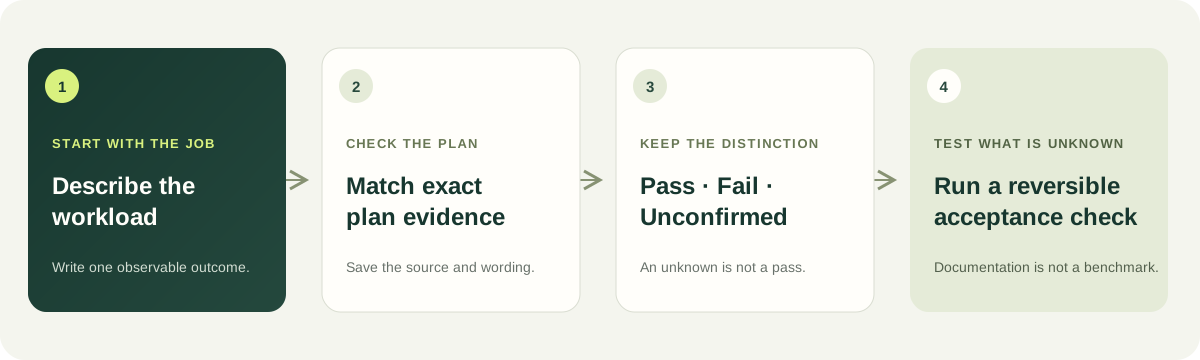
- Describe the job. Write one observable outcome the server must support, such as serving the application, storing its data, or receiving a connection from the operator's normal network. Avoid beginning with a plan size or a provider name.
- Separate hard requirements from preferences. Hard requirements decide whether a candidate can be used at all. Preferences help order the candidates that pass. Keep them in separate rows so a preference cannot hide a failed requirement.
- Match evidence to the exact plan. Record the plan name, official source URL, wording for the deciding field, and the date checked. A generic page for a provider is not evidence for a different plan or product family.
- Use three verdicts. Mark each requirement Pass, Fail, or Unconfirmed. Pass means the cited evidence answers that requirement. Fail means the evidence contradicts it. Unconfirmed means the source does not settle it.
- Filter before ranking. Remove candidates that fail a hard requirement. Keep Unconfirmed candidates in a question queue, not in the passing group. Compare preferences only among candidates whose hard requirements pass.
- Test what documentation cannot prove. If the workload depends on a real application, route, or recovery process, write an acceptance check and run it on a reversible trial where available. A specification is evidence about a published configuration; it is not a benchmark of your application.
The order matters. If you score every row together, a low price or larger disk can compensate numerically for an unmet access requirement even though the workload still cannot run. A pass/fail gate preserves the difference between “nice to have” and “must work.”
Copy this blank comparison record
Use one record per candidate. Leave a field Unconfirmed when the official source does not answer it; do not enter zero, “included,” or “unlimited” by assumption.
| Requirement | Evidence to save | Verdict | Next action |
|---|---|---|---|
| Workload outcome | The action the plan must support and your acceptance check. | Pass / Fail / Unconfirmed | Keep the test unchanged across candidates. |
| Compute and memory | Exact plan, allocation model, published limits, and official source wording. | Pass / Fail / Unconfirmed | Ask about the named plan if its allocation is unclear. |
| Storage and data path | Included storage type, extra volume terms, backup route, and any dependency the workload needs. | Pass / Fail / Unconfirmed | Check the complete data path, not the capacity number alone. |
| Network and location | Required region, address type, traffic direction, published transfer terms, and your own route check if needed. | Pass / Fail / Unconfirmed | Keep documentation and a live test as separate evidence. |
| Billing lifecycle | Selected term, amount due, renewal wording, and what happens when the resource is stopped or removed. | Pass / Fail / Unconfirmed | Resolve the purchase terms before ranking by price. |
Keep the shortlist separate from the invoice
This page answers “can this candidate meet my stated requirements?” It does not calculate the total cost of the first usable cycle. Once candidates pass the workload gates, use the separate VPS first-cycle cost method to compare invoice charges, required extras, migration overlap, and recovery work. Keeping those two decisions separate prevents price from being mistaken for technical fit.
For the actual purchase, verify the selected region, term, final amount, and renewal wording in the provider's official order flow. A third-party directory can help you discover a candidate; the exact provider page and your own order summary must settle the terms of that candidate.
Questions about comparing VPS deals
Should I choose the lowest displayed monthly price?
Not before the candidate passes the hard requirements. First record the actual plan, billing term, amount due, required extras, and renewal terms. Then compare eligible candidates using the same workload and evidence record. See the separate cost worksheet for the first usable-cycle calculation.
Does a VPS label tell me whether CPU time is dedicated?
No universal conclusion follows from the VPS label. DigitalOcean's official documentation distinguishes its shared-CPU and dedicated-CPU Droplets; apply that statement only to those products and check the allocation model of the candidate you are considering. Official source. Reviewed 2026-10-02.
If the documentation does not mention a requirement, should I assume it passes?
No. Keep the row Unconfirmed and ask the provider about the exact product. An unanswered field is not proof of failure, but it is not evidence of a pass.
Does stopping a Vultr server stop its charges?
Vultr's billing documentation says stopped servers continue to incur hourly charges until they are destroyed. Apply that statement to Vultr's documented server products; check another provider's own billing terms separately. Official source. Reviewed 2026-10-02.
Does a 200 OK response prove that a VPS plan is in stock?
No. RFC 9110 says that the request has succeeded
; for GET, the response represents the target resource. In practical terms, a successful response from a site's homepage does not establish the current inventory or orderability of a separate plan. Check the exact provider product and order flow. IETF RFC 9110: 200 OK. Reviewed 2026-10-02.
Return to the current VPS plans and official source records.